Out of the box, Copilot is kind of flat. It does not know your acronyms, your brand, or which settings your organization actually wants turned on.
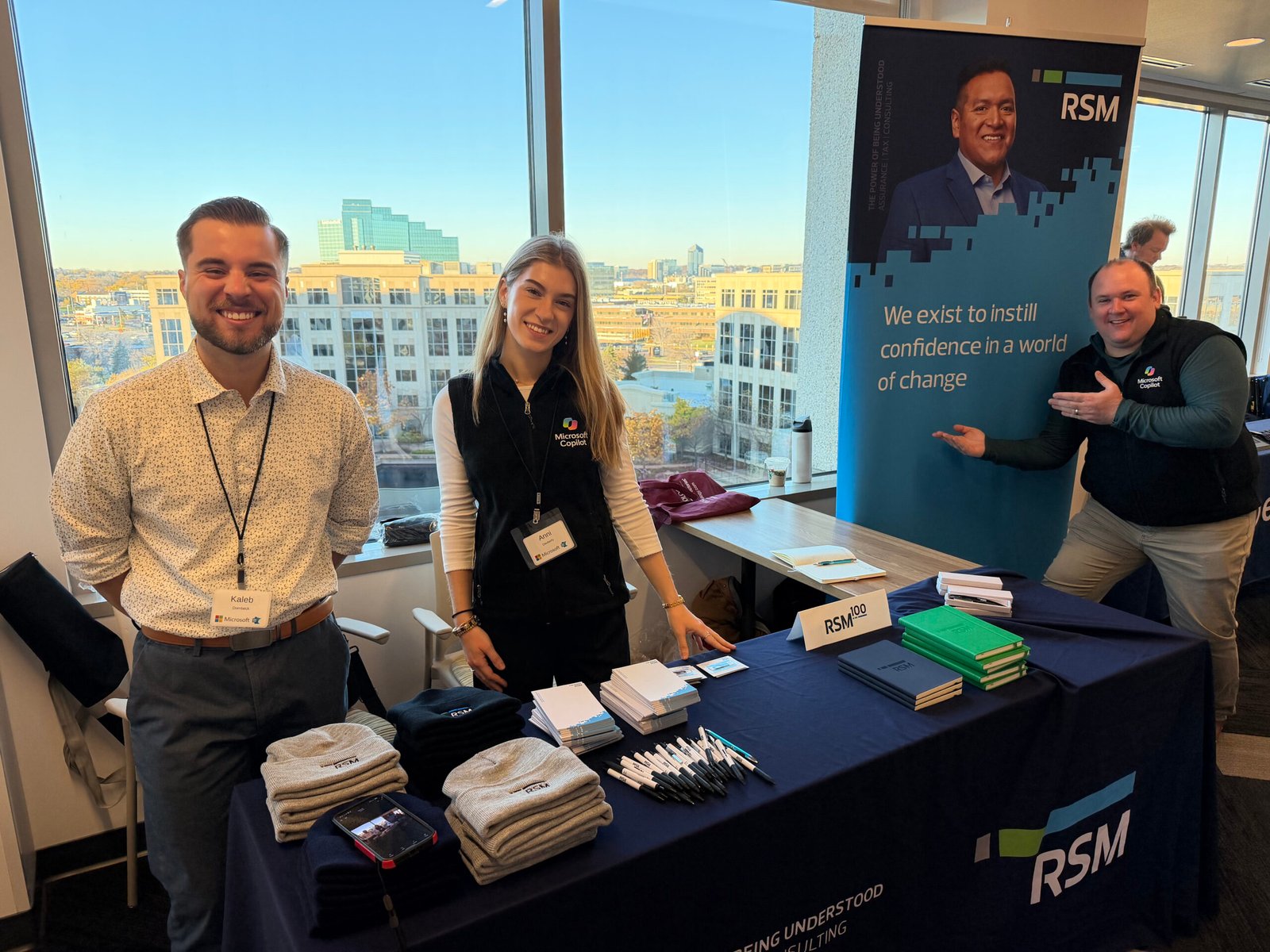
That was the starting point for the three-hour lab my RSM colleague Kaleb Dombeck and I ran at the Minnesota 365 User Group Fall Workshop Day on Friday, November 13: Making Copilot Fit for Your Organization: The Admin’s Guide to a Tailored Rollout. If you could not make it, here is the recap.
Copilot Admin Center Controls
Three admin centers do most of the work:
| Admin center | What you govern there | Role you need |
|---|---|---|
| Microsoft 365 admin center | Copilot features, agents, cost management | Global Administrator or AI Administrator |
| SharePoint admin center | Content and who can access it | SharePoint Administrator |
| Teams admin center | Meetings and the Teams experience | Teams Administrator |
A few settings sound like twins, so here is the difference:
- Self-service purchases. On by default. Someone finds the right button, starts a trial, and gets charged when it ends. Turn it off.
- Release preference vs. Frontier. Release preference lets you take new features at general availability or 30 days later, which is the go-to if you want to vet them first. Frontier is backstage access to preview features, scoped to a rollout group.
- Pin Copilot in apps vs. the Windows taskbar. One pins Copilot inside the Microsoft 365 apps, the other pins the desktop app. I love having it in Outlook and Teams so I can stay in my flow.
- AI experiences enabled by usage-based billing vs. Access requests to usage-based billing experiences. The first decides whether users can see experiences like Cowork, and it’s deprecated and will be replaced by a new setting that allows admins to control whether users or groups can request access to experiences that require usage-based billing. The second is that replacement. It decides who can ask for a spending policy: all users (the default), specific users and groups, or no users. I’d scope it to your pilot group before people start finding Cowork.
You can also control web search, screen and camera sharing (brand new and Copilot Voice only), image and video generation, and response sharing. Most of these can be scoped, like giving image generation to marketing only.
Copilot in Teams Meetings
Teams now lets you block third-party note taker bots outright, instead of only detecting them or requiring approval. Copilot already gives us intelligent recap, so we do not need a third party processing our meetings. While you are there, do not let everyone bypass the lobby, and limit admitting people to organizers and co-organizers.
Copilot Model Choice: Subprocessors vs. Independent Processors
Two settings that sound almost identical:
- Microsoft subprocessors, like Anthropic and OpenAI, keep data inside the Microsoft boundary with enterprise data protection.
- Independent processors go outside it, so Microsoft cannot promise that protection. Keep these to demo tenants and read the terms.
Only users with a full Microsoft 365 Copilot license get models beyond OpenAI, so check licensing before you troubleshoot. I scope new models to a security group and run the same test prompt on each one. When I compared SpaceX AI to Anthropic on an admin controls question, Anthropic was more technical and SpaceX AI was more bloggy.
Agent Management and Copilot Cost Management
You do not need Agent 365 to start governing agents. Kaleb calls it a three-door process: who can access agents, which types are allowed, and who can share what they build. I recommend Microsoft agents and turning off external publishers unless you trust them. Remember that agents still respect permissions, so a shared SharePoint agent will not work for someone without access to its knowledge source.
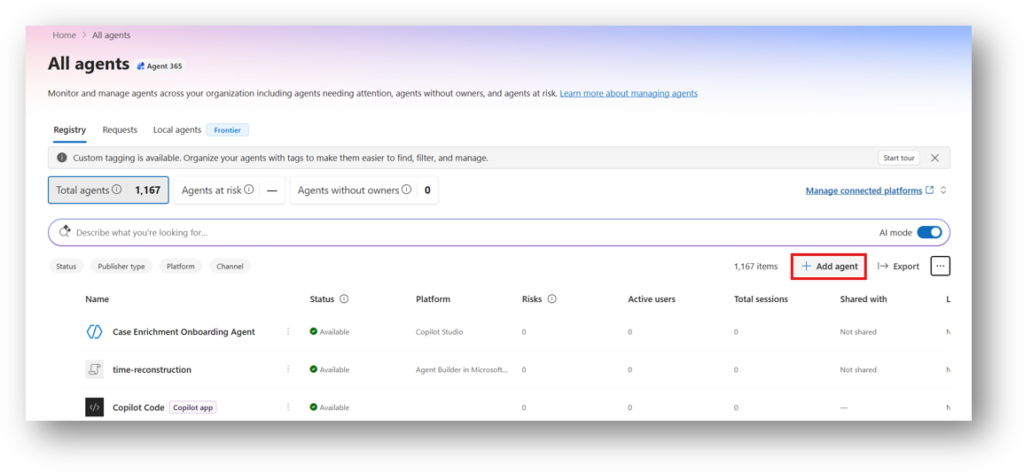
The agent registry also has a free inventory hiding in plain sight. Customize the view to show publisher, owners, sharing, and last use, then export it. My prediction is that agent sprawl is the next wave to govern after content sprawl.
Cost management covers Cowork, Copilot Code, and the paid experiences coming next. You need an Azure subscription or prepaid credits. A billing policy lets you scope to groups, pick services, set spending limits down to the user, and add alerts. Kaleb highly recommends turning off allow new agents and services as they become available, so unvetted features do not quietly eat your spend. And prepaid credit packs do not roll over. Use them or lose them.
Org Prompt Library, Domain Exclusions, and Custom Dictionary
Organizational Prompt Library
Find it under Copilot, then Prompts in the Microsoft 365 admin center. Users see your prompts in a Suggested section and in Prompt Gallery. Create them in the UI or import a CSV. Users only see the title and display prompt. The description is for admins, and the full prompt does the heavy lifting behind the display text. Use the analytics to pin the winners and retire the rest. The room’s favorite idea: turn meeting notes into an SOP using a company template.
Web Grounding Domain Exclusions
Microsoft’s PowerShell script lets a Global or Search Administrator block specific sites from web grounding. Export your current list, edit the two-column CSV (the domain and whether to include subpages), upload it, and wait about 24 hours. In Kaleb’s demo, Copilot refused to give a history of the Edmund Fitzgerald using only archive.org. Success.
Keep a master copy of your CSV, because an update replaces the whole configuration. Results vary (Wikipedia has a lot of domains), it only goes two subdomains deep, and other sites quoting a blocked domain can still show up.
Copilot Custom Dictionary
Upload your acronyms and team names so Copilot recognizes how your organization talks. Each term gets one definition, and a new upload replaces the old dictionary. One update since the session: Microsoft’s documentation says the dictionary currently improves Teams meeting transcripts, with long forms and definitions coming to intelligent recap and Copilot responses later.
Copilot Brand Kits and Org-Wide Skills
Brand kits package your templates, images, logos, colors, fonts, brand voice, and skills so Copilot output looks and sounds like you. Brand voice is my favorite part. Describe your audience, tone, and energy, or have Copilot interview you to draft it.
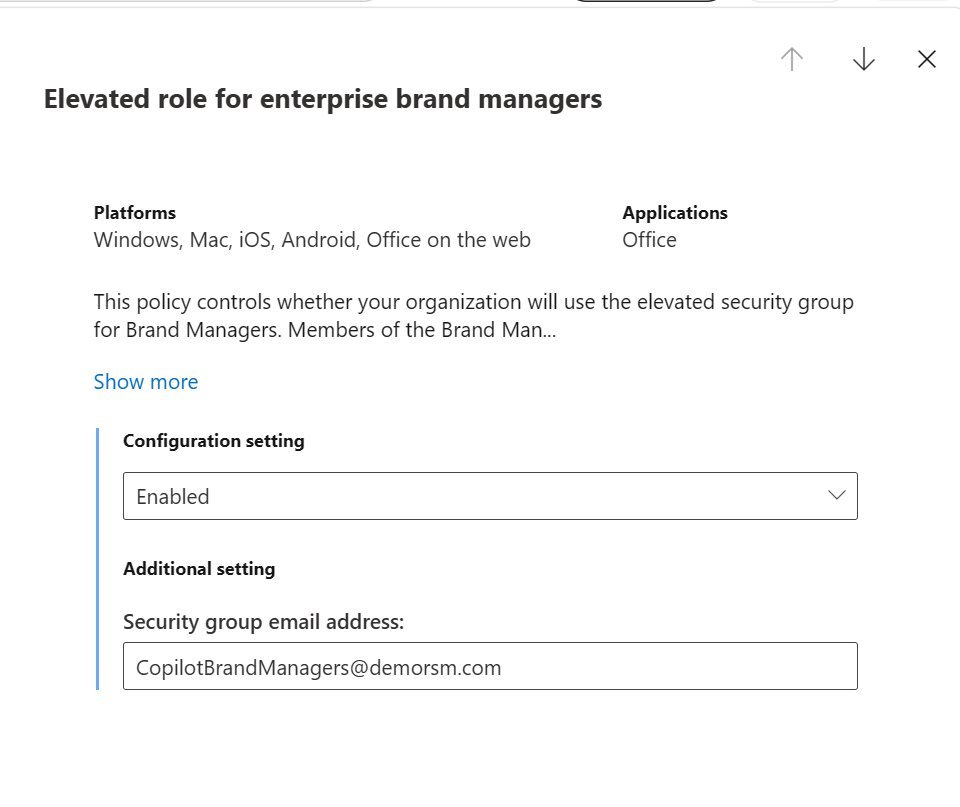
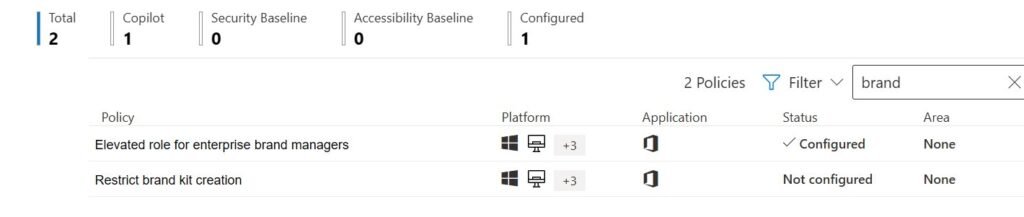
To make a kit official, go to config.office.com, then Customization, then Policy Management. Enable the Elevated role for Brand Managers in a tenant policy with priority 0. It needs a mail-enabled security group and can take up to 24 hours. You can also restrict who creates personal brand kits by enabling the restrict brand kit creation option.
Org-wide skills let you publish a repeatable set of instructions to everyone or to specific groups. The package needs a manifest JSON file and two icons, which I have Copilot build from my skill file. Upload it in the agent registry under Add agent, which is not obvious at all. Org skills are off by default for users, so if someone cannot see one, have them turn it on.
Please do not publish a first-pass skill. Run a skill sprint with your champions: everyone runs it, you compare the outputs, ask Copilot what to change to match the best run, and repeat.
Tracking Copilot Adoption with Viva Insights
The Copilot Dashboard in Viva Insights is a life hack. It shows adoption by app and group, usage intensity, top request types, and Copilot-assisted hours. You need at least 50 Copilot licenses for the full picture, and viewers are assigned separately, which means executives can see it without admin access.
Smaller tenant? The Copilot usage reports in the admin center show who is active and in which apps. Look at trends, not totals, and use the readiness and Copilot Chat reports to find who should get the next license.
Want to go deeper on what to do with those numbers once you have them? I wrote all about it in You Launched Copilot. Now What?
Three Things to Remember
- Start in the admin center. Configure the defaults that cost money or send data outside the Microsoft boundary before you personalize anything.
- Do not roll everything out to everybody. Almost every setting we covered can be scoped to a group.
- Personalization drives adoption. Prompts, dictionaries, brand kits, and skills are small admin tasks that make Copilot feel built for your people.
Slides and Resources
My slides and the tenant readiness scorecard are on my link tree. These Microsoft Learn pages go deeper:
- Configure Microsoft Copilot settings in the Microsoft 365 admin center
- Organizational prompts for Microsoft Copilot
- Domain exclusion overview
- Manage custom dictionaries for Microsoft Teams meetings and events
- Configure brand kit governance and organizational assets
- Microsoft Purview DLP for Microsoft 365 Copilot and Cowork
Thank you to everyone who spent their Friday morning with us, to Kaleb for being a great co-presenter, and to the MN365 organizers, volunteers, and sponsors for making the day possible. See you at the next one!
Disclosure: This post was drafted with the assistance of AI, using the recording and transcript of my MN365 Fall Workshop day session as source material. All content was reviewed and edited by me prior to publication. The ideas, examples, and frameworks presented are my own.