
The model landscape is progressing. On September 12, 2026, Microsoft announced that Grok models from xAI are rolling out inside Copilot for Word, Excel, and PowerPoint. Modernization is exciting, but naturally, when changes like this arise, I get skeptical and like to evaluate the risks before getting swept up in it. If your inbox has already started filling up with questions from your leadership team, you’re not alone. Here’s the breakdown, minus the hype, plus a real test of what the output looks like.
What the New Grok Models in Copilot Do
Microsoft added Grok as a third model choice inside Copilot, joining GPT and Claude. Once enabled, users see a dropdown in Word, Excel, and PowerPoint where they can either let Copilot auto-select the best model for a task or manually pick Grok themselves.
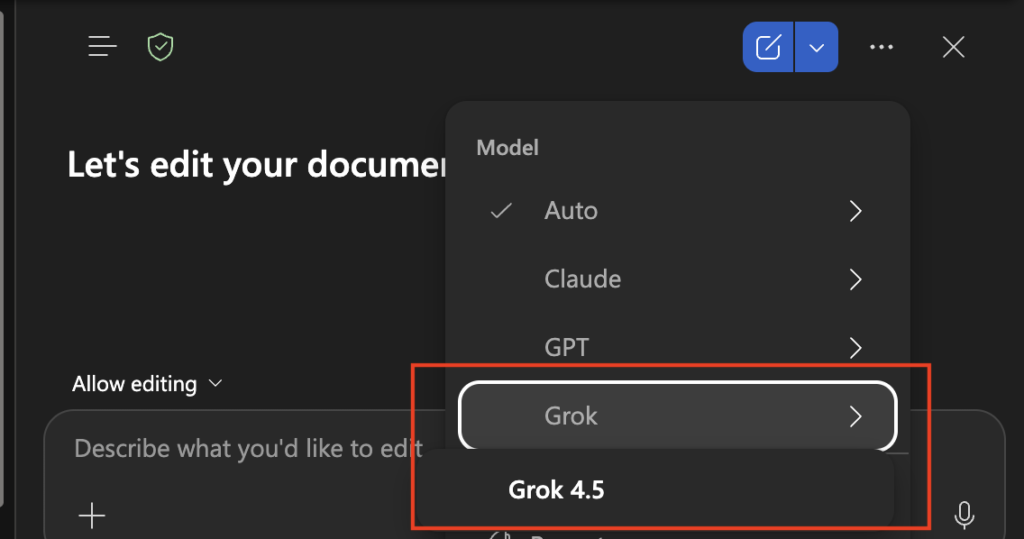
Access is rolling out through the Microsoft Frontier Program, starting with a focused preview. That means most organizations are not seeing this in their tenant yet, and won’t unless they’re enrolled in Frontier and choose to enable it.
Enablement Requires Admin Action
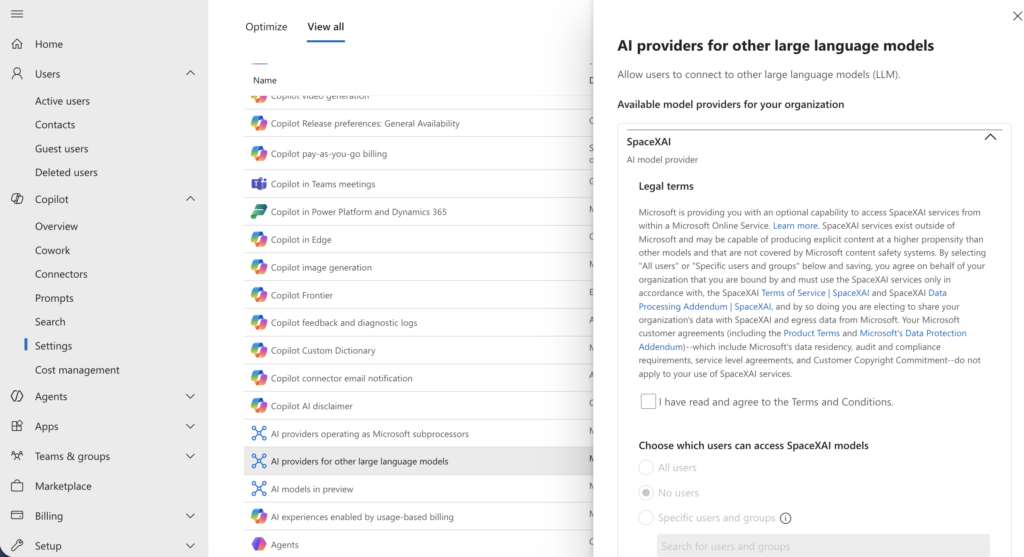
This isn’t a change that shows up automatically. Microsoft put it behind an admin setting, off by default, so someone has to go flip the switch. Specifically, it lives in the Microsoft 365 admin center under Copilot > Settings > View all > AI providers for other large language models, where SpaceXAI (that’s Microsoft’s internal name for xAI/Grok) shows up as one of the available providers. A Global admin has to select it, accept the legal terms, and then explicitly choose which users or security groups get access before anyone in the tenant can touch it. It can also take a few hours after connecting for the change to take effect.
That last step matters more than it sounds like. Access isn’t all-or-nothing: admins can scope it to specific users or Entra ID security groups, and that assignment is enforced across both Copilot and Copilot Studio. So an org could enable Grok for a pilot group without opening it up tenant-wide.
If you want the full walkthrough, including how to disable it again once it’s on, Microsoft’s documentation is here: Connect to SpaceXAI models.
A few other access details worth flagging:
- The preview is not available to Frontier customers in the EU, EFTA, or the UK right now.
- xAI has been added to Microsoft’s Online Services Subprocessor List, which is the mechanism that gives admins visibility into what’s processing their data.
- Some Grok variants run outside Microsoft’s own infrastructure and are governed by separate xAI terms, not Microsoft’s standard data processing agreement.
What Grok Models Bring to Copilot
xAI has positioned Grok for agentic tasks and knowledge work, which fits document, spreadsheet, and presentation work well. Responses still run inside Copilot’s normal guardrails and system prompts, keeping output consistent with what users expect. You’re not getting a different personality in your spreadsheet, you’re getting a different engine doing the reasoning.
To see what that looks like in practice, I ran a controlled test. I gave Copilot in Word the same prompt twice, once set to GPT and once to Grok: a one-page executive summary, 300 to 350 words, aimed at a CIO with no technical background, covering why over-permissioned SharePoint sites matter for a Copilot rollout, three concrete risks, and two recommended next steps before go-live. Same instructions, same document type, same audience. The only variable was the model.
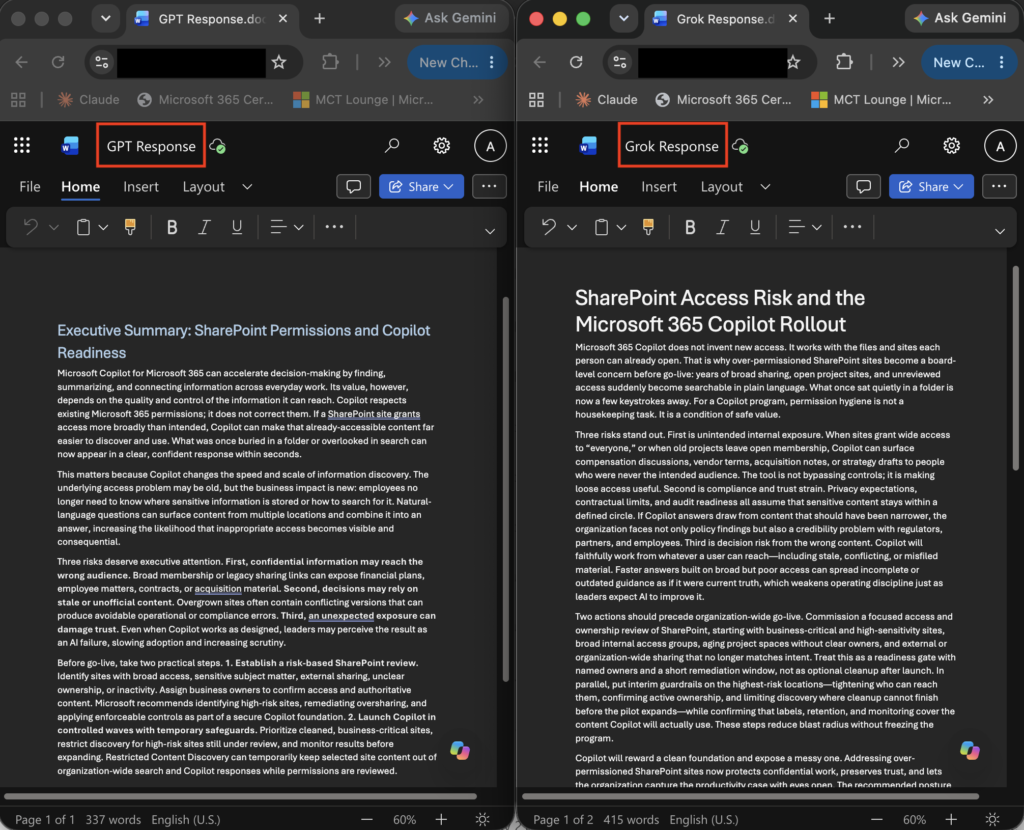
GPT stayed inside the lines. The model landed at 337 words, fit on one page, and numbered the actions clearly enough to lift into a project plan. It also named an actual Microsoft capability, Restricted Content Discovery, as part of the mitigation, which tells me the model wasn’t reasoning about SharePoint governance in the abstract. It knew the product surface well enough to point at a real setting someone could go turn on.
Grok ignored the word count. It came back at 415 words and ran onto a second page, about 18 percent over spec. The opening line was sharper than GPT’s, more quotable, more blog-voice: “Microsoft 365 Copilot does not invent new access.” If I were grading on hook alone, Grok wins. But the two recommended actions I’d asked for got folded into one dense paragraph instead of standing apart, and the whole response stayed conceptual. Access reviews, ownership, interim guardrails, all reasonable, none of it named a specific tool the way GPT did.
Is Enabling Grok Models in Copilot a Real Risk?
This is the question on everyone’s mind, and the honest answer is that it comes down to governance, with real trade-offs on both sides. Here’s how I’d break down the actual risk surface, informed by what I saw in testing.
Data residency and processing
This is the biggest one. Some Grok variants run outside Microsoft’s own infrastructure, governed by xAI’s own terms rather than Microsoft’s standard enterprise data processing agreement. The subprocessor list entry gives admins visibility into this, but visibility isn’t the same as control. Orgs in regulated industries, healthcare, financial services, legal, or with contractual data residency commitments, should treat this as a legal or compliance conversation, not just a technical toggle.
Regulatory exposure
Microsoft has not made this preview available in the EU, EFTA, or the UK. Organizations with EU users or EU data should account for that restriction when planning a rollout, even if the organization itself is US-headquartered.
Reputational and content risk
Grok’s public-facing product has had well-documented controversies around content moderation, including its handling of sensitive image generation. Microsoft states that Copilot’s guardrails and system prompts apply regardless of which underlying model is handling a request. In this test, the content produced by Grok was on-topic and did not raise moderation concerns. The output did not follow the specified word count. Based on this single test, Copilot’s guardrails appear to function as described; whether Grok reliably follows structured formatting instructions would require additional test cases to confirm.
Instruction-following and specificity
This is the risk category the governance conversation usually skips, and my test put it front and center. A model that stays fluent but generic is a different kind of liability in an M365 governance context than one that names the actual feature that solves the problem. GPT did the latter in this test. That’s not a permanent verdict on Grok’s capability, it’s a preview model on one prompt, but it’s a concrete reason to test before you deploy rather than assume all three models in the picker are interchangeable.
What’s low-risk here
- It’s off by default, so there’s zero accidental exposure. Nobody in a tenant will suddenly start routing requests to Grok without an admin deliberately flipping the setting.
- It’s currently limited to Frontier Program participants only, so most orgs aren’t even in a position to enable it yet.
- Admins keep the choice of which apps and which users get access. It’s not an all-or-nothing switch.
My honest take: don’t enable it reflexively just because it’s available, and don’t dismiss it reflexively either. Understand where your data goes once Grok is enabled, confirm what “outside Microsoft’s infrastructure” means for your setup, and pilot it with a low-stakes team before rolling it out to anyone handling sensitive information. And pilot it with an actual test prompt relevant to the work that team does, not just a read of the press release. What a model produces and what it’s positioned to do aren’t always the same thing.
I’m not a lawyer, and none of this is legal advice, especially on the regulatory angle. If your organization has hard compliance requirements riding on this, that’s a conversation for their legal or privacy counsel with the actual DPA language in front of them, not just press coverage.
Grok Models in Copilot: How I’d Approach It
Here’s how I’d work through this:
- Confirm whether the org is even in the Frontier Program. If not, this is a non-event for now.
- If they are, don’t flip the setting without a conversation first. Bring data residency and the subprocessor question to whoever owns vendor risk.
- Test before you recommend. Run your actual use case through both models before deciding which one, if either, fits. A content team drafting outward-facing copy might get real value from Grok’s tone. A team producing governance memos or deliverables with hard formatting requirements may find GPT more reliable out of the box.
Multi-model Copilot is the direction Microsoft is headed. The right response is neither immediate enablement nor outright avoidance, but the same governance-first approach applied to any new Copilot capability, now informed by an actual test of what each model produces.