AI meeting assistants are all the rage. They join your meetings as someone’s “helpful note taking assistant,” a plain gray square that quietly listens in the corner, collecting your organization’s sensitive meeting data. This new Teams external bot policy is built to close that gap.
This new Manage external bots and their access to meetings policy setting now acts as our virtual bouncer, filtering and requiring approval before we let AI bots in the door, to actually enforce our organization’s AI acceptable use policies.
What the Teams External Bot Policy Does
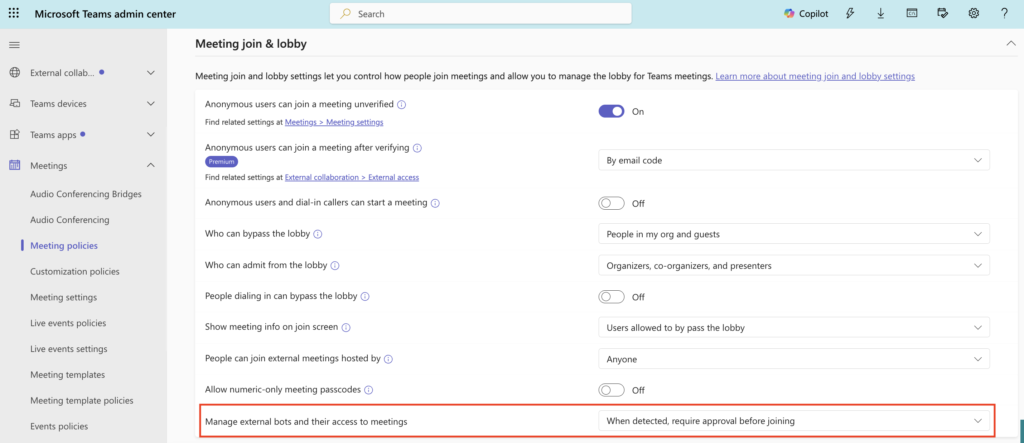
The setting lives in Meeting policies, under Meeting join and lobby, labeled Manage external bots and their access to meetings. RequireApprovalWhenDetected is the default in the global policy. It places detected bots in the lobby regardless of whether the meeting itself allows other participants to bypass the lobby. Teams uses behavioral and infrastructure signals collected during join to flag a participant as a bot, then routes it to the lobby regardless of the organizer’s normal lobby settings, and prompts the organizer to make an explicit decision before that bot gets a seat at the table.
Your Teams External Bot Policy Options Today
Right now there are two options, with a third on the way:
- Do not detect bots (AllowBots) turns detection off entirely. Bots join like any other guest.
- When detected, require approval before joining (RequireApprovalWhenDetected) is the default. Bots get parked in the lobby and identified as bots, and someone has to consciously click admit.
- Block detected bots (BlockDetectedBots) (Roadmap ID: 566201) is rolling out now, with general availability expected by late September 2026. This option will deny detected bots outright. It ships off by default, so nothing changes in your tenant unless an admin turns it on.
Why the Teams External Bot Policy Matters for AI Governance
For those of us who live in governance and AI acceptable use policy work, this is a real gate. It sits in front of a problem we have mostly been solving with training and trust. A policy document can tell employees not to let unapproved AI note takers into sensitive meetings, but that policy is only as good as whether someone notices the gray square before hitting admit all. This setting takes that decision out of muscle memory and puts it in front of the organizer as a deliberate choice.
An unapproved bot in your meeting is not just an awkward guest. It is a data handling decision nobody signed off on. That bot gets access to conversations, recordings, and transcripts outside your tenant’s compliance boundary. It grants a third-party service access to that data. And that data sits under someone else’s DPA, retention policy, and security controls, not your org’s.
If you have not confirmed RequireApprovalWhenDetected as your baseline, do that first. It is the default, but it is worth verifying rather than assuming. From there, it would also be worth considering a stricter custom meeting policy built on BlockDetectedBots once it reaches general availability, scoped to groups handling sensitive data, like legal, HR, or executive leadership. Once the technical control is in place, update your AI acceptable use policy and helpdesk documentation to reference this setting by name, so the policy and the enforcement mechanism are telling the same story.
The Native Alternative: Facilitator
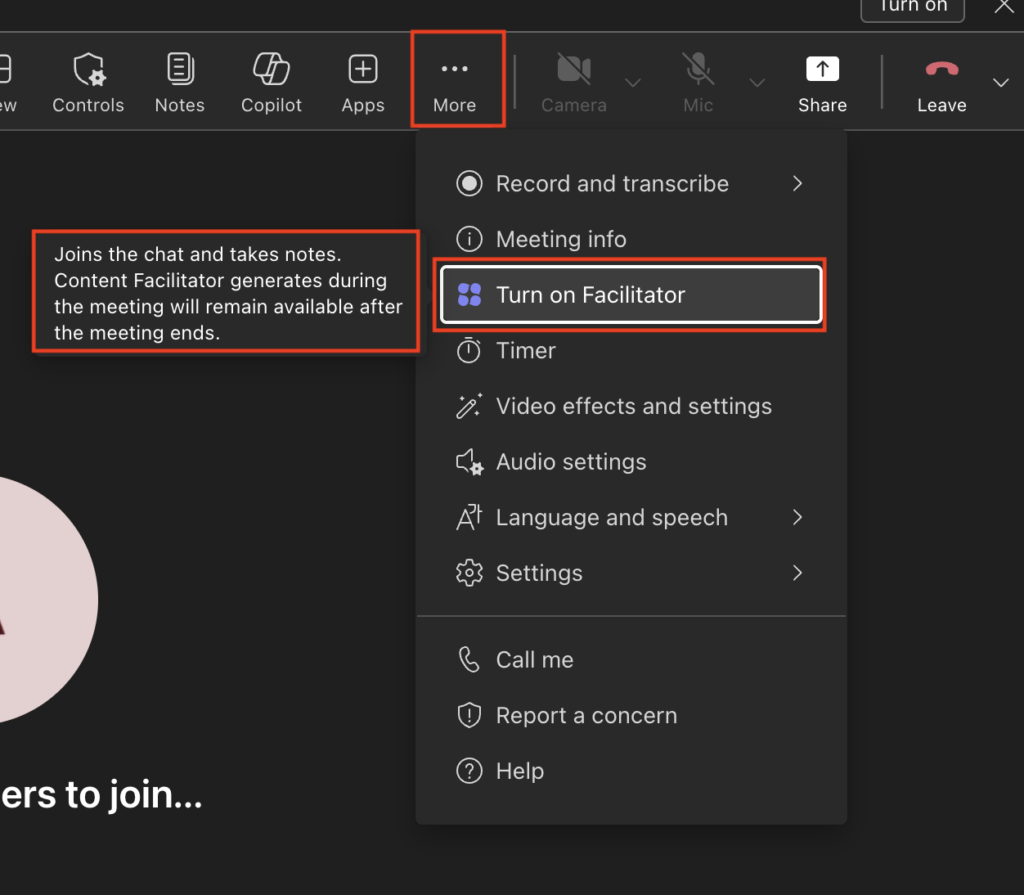
There is also a simpler fix sitting under most of these organizations’ noses. If the reason someone invited a third party bot in the first place was note taking, agenda tracking, and action items, Facilitator already does that natively, and it is included with the Microsoft 365 Copilot license. Facilitator shows up as a participant in the meeting, but it runs inside your compliance boundary instead of shipping transcripts to a 3rd party vendor’s servers. It drafts the agenda, posts live notes everyone can see and edit, and captures decisions and action items that sync to a meeting plan afterward, all without a new SaaS agreement, a new data processing addendum, or a gray square nobody can quite place.
If you have not confirmed your baseline is RequireApprovalWhenDetected, do that today. Keep BlockDetectedBots on your radar as it rolls toward GA, and if the real problem is people wanting a note taker, just turn on Facilitator. It solves the actual need without adding another vendor to your data map, and your bouncer stops working overtime.