
Copilot Cowork hit general availability on June 16, and with it came the thing everyone in the Frontier preview knew was coming eventually: a real bill. If your org was on Frontier, the free ride ends July 1. If you’re just turning Copilot Cowork on now, you’re walking in with the meter already running.
Tokenmaxxing is the practice of squeezing maximum value out of every credit you spend on an AI tool so you get the best possible output without burning through your budget unnecessarily. Think of it as the Copilot equivalent of optimizing your cloud spend: same outcome, less waste.
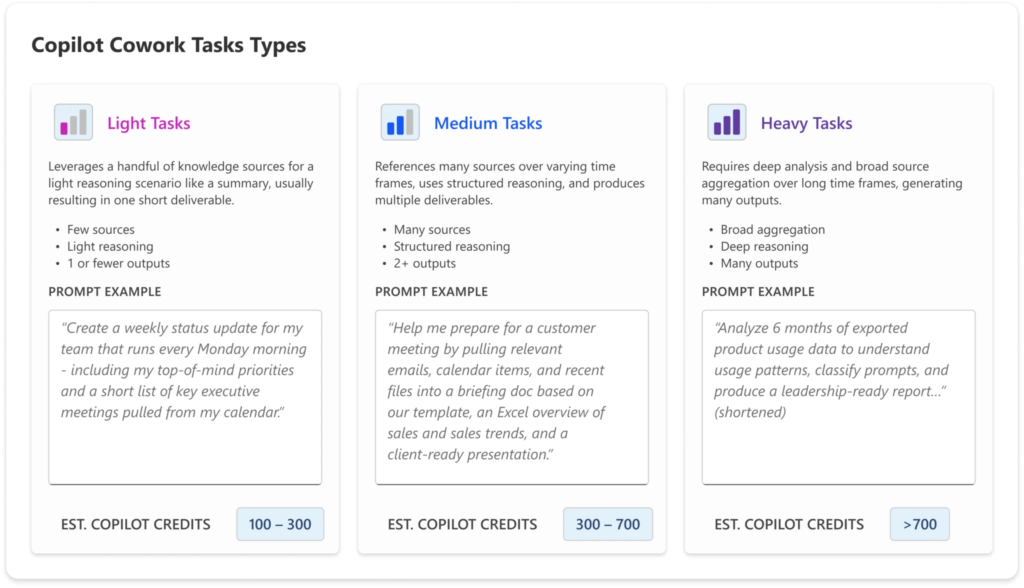
Here’s what changes with GA. Copilot Cowork isn’t priced per seat like the rest of Copilot. It’s priced per task, on a sliding scale, and every credit costs $0.01 on the pay-as-you-go plan. Microsoft groups tasks into three rough tiers — light tasks run around 100 to 300 credits ($1 to $3), medium tasks around 400 to 700 credits ($4 to $7), and heavy tasks come in at 700 or more credits ($7 and up). Those are illustrative ranges, not fixed rates. The actual cost of any given task depends on the model used, how much context it retrieves, how many tool calls it makes, and how long it runs.
Multiply that across a team running 20-40 tasks a month each and you can see where this goes. So let’s talk about how to keep the work valuable without watching the spend spiral.
1. Scope the ask, not just the topic
Source: Microsoft 365 Blog
The biggest cost driver isn’t the model. It’s how much work Cowork has to do to satisfy what you asked for. A vague prompt forces it to retrieve more, plan more steps, and call more tools to cover its bases.
“Summarize my email from the last 24 hours” is a light task. “Analyze my recent emails, meeting notes, CRM updates, and support tickets to figure out deal risk” is a heavy one, because now it’s pulling from four systems instead of one and synthesizing across all of them.
Neither is wrong to ask. But know which one you’re asking for. If you only need the email summary, don’t open the door to the whole data estate.
2. Control what it’s allowed to ground against
This is the one people miss. Cost isn’t just about what Cowork does, it’s about what it has to look at to do it. The four things Microsoft meters are model used, context retrieved, tool calls, and runtime. Context retrieval is fully in your control.
If a task only needs your inbox, don’t let it loose on SharePoint, Teams, and OneDrive too. Scoping the data source down to what’s actually relevant is one of the cheapest changes you can make, and it has the side benefit of making the output more accurate, because it’s not getting distracted by irrelevant context either.
3. Don’t default to the top-tier model for routine work
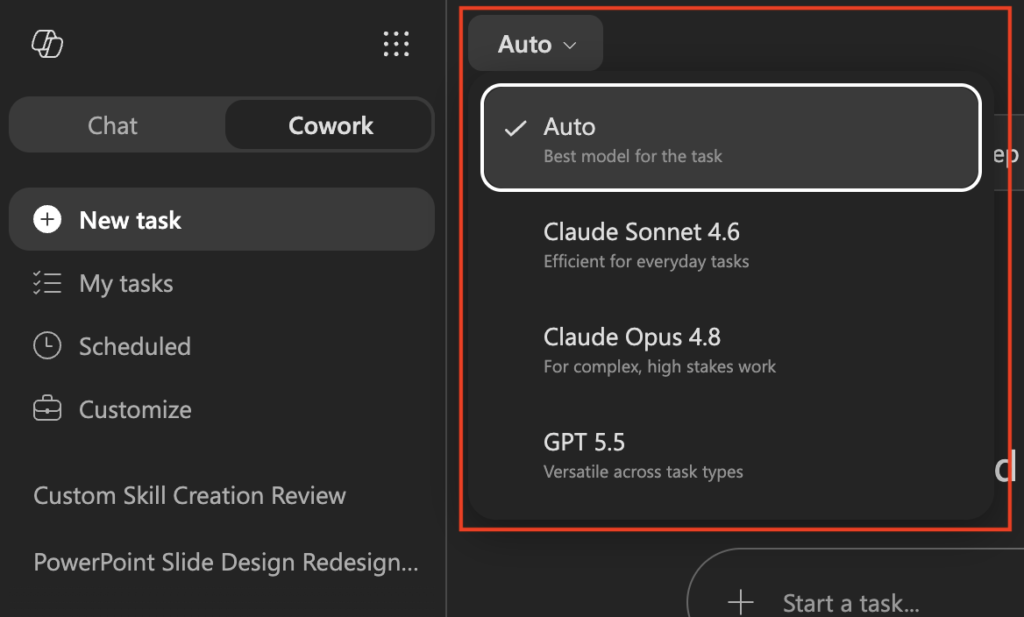
If your org has model selection enabled, this matters more than people expect. Frontier-tier models cost more per credit than lighter models, and a lot of routine Cowork work doesn’t need frontier reasoning. Sorting an inbox, drafting a routine email, pulling a quick status update, none of that needs your most expensive model.
Save the top-tier model for the work that actually benefits from it: synthesis across messy unstructured data, judgment calls, anything where a wrong inference is expensive. Save the expensive model for work that actually needs it.
4. Check your spend mid-task, not after the invoice
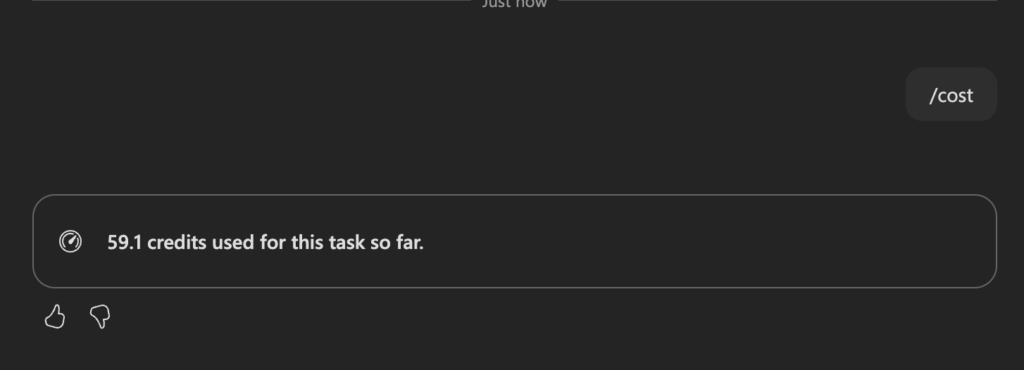
Cowork has a /cost skill that shows credit usage in-session, while the task is still running. Use it. Waiting for the monthly Cost Management dashboard report means you find out you overspent after the spending already happened.
This matters even more for scheduled tasks. A lot of Cowork work runs unattended in the background, which means nobody’s watching the meter in real time unless someone builds the habit of checking. Build the habit now, before a scheduled task runs all night unattended.
5. Govern at the tenant level, not just the user level
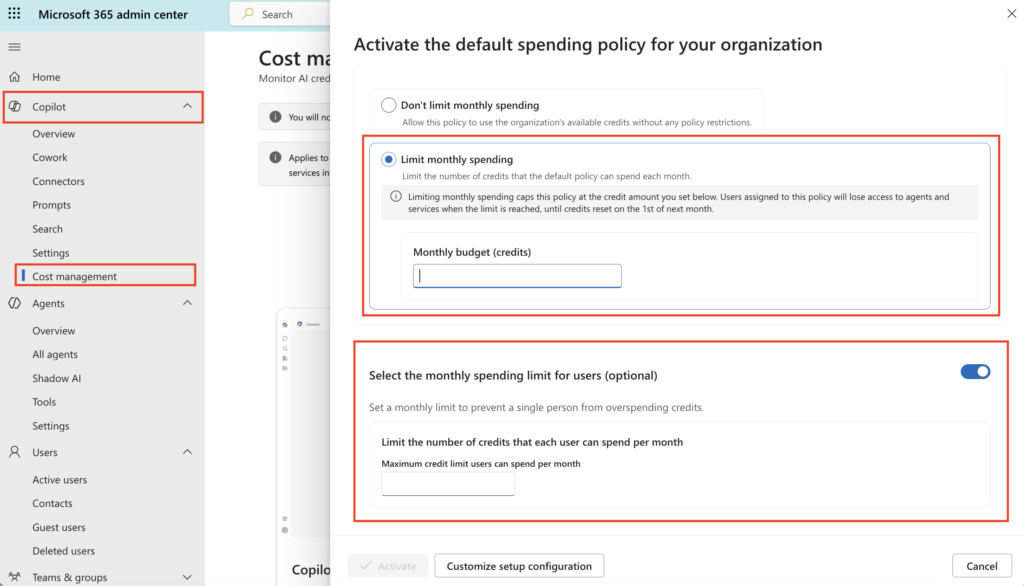
Individual good habits only get you so far if spend is uncapped by default at the admin layer. The Microsoft 365 admin center’s Cost Management dashboard (M365 admin < Copilot < Cost Management) is where the real control lives: set spending policies, allocate credits by group, cap usage before it becomes a surprise line item.
If you’re the one fielding the “why did our AI bill triple” conversation with finance, this is where you want to have already drawn the lines. Don’t wait until usage patterns force the conversation. Set policy first, let people work inside it.
Read more about usage-based billing and cost management for Copilot Credits.
The bigger shift here
Microsoft just moved a chunk of Copilot from “predictable per-seat software” into “cloud consumption economics.” That’s not a bad thing, it actually means the tool finally has a real cost signal attached to real value delivered. But it does mean the muscle memory from flat-rate Copilot doesn’t transfer. Tight scoping, deliberate model choice, and tenant-level guardrails aren’t optional anymore, they’re the difference between Cowork being a smart investment and Cowork being the line item nobody can explain in the next budget review.
For more information about estimating Cowork spend, download the cost estimator.
Which of these are you already doing and which one are you adding to your workflow first?