
Last week I talked about tokenmaxxing, getting the most out of every Copilot Credit you spend in Copilot Cowork. But now that Copilot Cowork Credits pricing is live, the real move might be knowing when to skip Cowork entirely.
Welcome back to Copilot Summer School, the bi-weekly series for busy M365 professionals who want to get smarter about Copilot all summer long. If you missed Lesson 1, catch up here. Today we’re getting practical about a question I’ve been getting a lot since Cowork went GA: “Should I be using Cowork for this?”
The Free Ride Is Over
If your organization was in Microsoft’s Frontier program and had at least one user running Cowork between March 30 and June 16, 2026, you’ve been living in a grace period: no billing, no consequences, just vibes. That grace period ends today (July 1, 2026).
After July 1, any tenant without usage-based billing configured in the M365 Admin Center loses access to Cowork entirely. Not a soft warning. A hard shutoff.
And for everyone else who didn’t touch Frontier? Billing started at GA on June 16th. Either way, the era of free Cowork experimentation is over.
Cowork now runs on a metered model called Copilot Credits ($0.01 each, billed per task based on model, context retrieval, tool calls, and runtime). A light task runs you $1 to $3. A heavy one can hit $7 or more. That’s not expensive in isolation, but it adds up fast if you’re using Cowork for things that don’t need it.
Which brings me to the real lesson for today.
Use Case Mapping: When You Don’t Need Cowork
Cowork is powerful. It’s also metered. So before you spin up a task, it’s worth asking: is this actually a Cowork problem, or can standard Copilot handle it?
Here are six common scenarios where users have been reaching for Cowork, and what to do instead.
Scenario 1: “Summarize this meeting and send a recap”
Why people think they need Cowork: It involves reading something and sending something, which sounds agentic.
Why they don’t: This is a single-step, single-output task with no reasoning chain required. Copilot in Teams already handles meeting recaps natively. After any recorded/transcribed meeting, Copilot can summarize key points, action items, and decisions right inside the meeting chat.
Do it with standard Copilot instead:
- In Teams, open the meeting recap and use Copilot to generate a summary
- Use Copilot in Outlook to draft a recap email from that summary
- Or use a Copilot prompt in the Teams meeting chat: “Summarize the key decisions and action items from this meeting in a format I can paste into an email”
The rule: If it’s one source, one output, one send, it’s a Copilot prompt, not a Cowork task.
Scenario 2: “Draft a proposal based on our template”
Why people think they need Cowork: It involves pulling in a document and writing something new.
Why they don’t: Copilot in Word is purpose-built for exactly this. If you have a template and a context brief, Copilot in Word can generate a polished first draft without ever touching Cowork.
Do it with standard Copilot instead:
- Open your proposal template in Word
- Use Copilot in Word: “Draft the executive summary and scope sections based on this template and the following context: [paste context]”
- Iterate section by section using the Copilot sidebar
The rule: Drafting in a known template with provided context equals Word plus Copilot. Save Cowork for when the inputs are scattered across systems and the output requires multi-step reasoning.
Scenario 3: “Create a status update from my tasks and emails”
Why people think they need Cowork: Pulling from tasks AND emails sounds multi-source.
Why they don’t: This is a well-scoped, single-output task that Copilot in Outlook and Teams handles well. The inputs are contained, the output is one document, and there’s no branching logic.
Do it with standard Copilot instead:
- In Copilot Chat: “Based on my emails and meetings from this week, draft a status update covering what was completed, what’s in progress, and any blockers. Format it for a Monday morning team standup.”
- Tip: Use the forward slash (/) on your keyboard to easily attach M365 artifacts to your prompt:
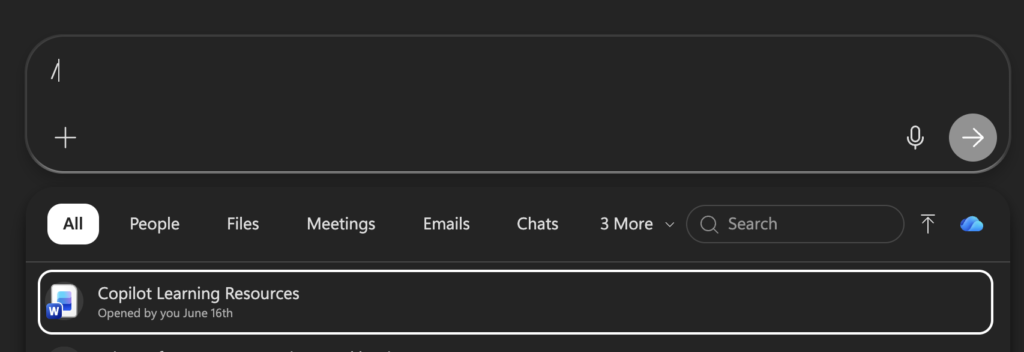
The rule: Weekly standup content, status emails, brief summaries equal a Copilot Chat prompt. One turn, one output, done.
Scenario 4: “I need a report that runs every Friday, pulling from multiple sources”
Why people think they need Cowork: Recurring execution feels inherently agentic. Running on its own without you triggering it sounds like exactly what Cowork is for.
Why they don’t: Copilot Chat lets you schedule any prompt to run automatically. Hover over a prompt you’ve already run, select Schedule this prompt, and choose when it runs, how many times, and whether you want an email notification when the response is ready. No Cowork credits required, just a saved prompt and a cadence.
Do it with standard Copilot instead:
- Run your prompt once in Copilot Chat to get it dialed in: “Every Friday, remind me of messages and tasks from earlier in the week that still need follow-up”
- Hover over that response, select Schedule this prompt, and set it to run every Friday at 8am:
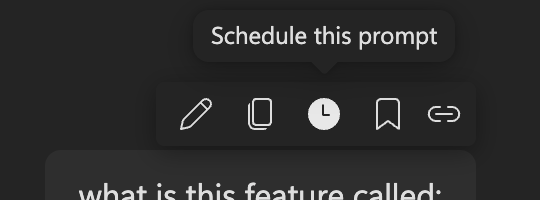
- You can create up to 10 different scheduled prompts, and results land right in your Copilot conversation history, bolded so they’re easy to spot
The rule: If “recurring” is the only reason you’re reaching for Cowork, check Copilot Chat’s scheduled prompts first. Save Cowork for recurring tasks that need true multi-step reasoning or orchestration across systems beyond a single prompt’s reach.
Scenario 5: “Research this new company before our meeting”
Why people think they need Cowork: Researching a company sounds like exactly the kind of open-ended, multi-source task Cowork was built for: pulling from the web, cross-referencing information, building a profile.
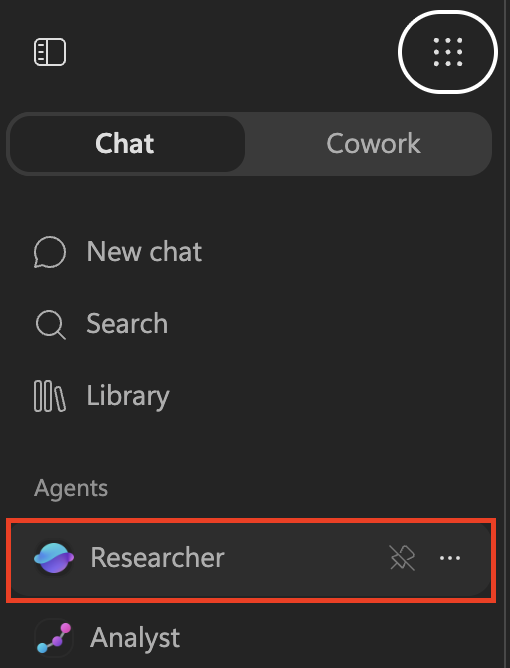
Why they don’t: This is what the Researcher agent in Microsoft 365 Copilot is built for. Researcher combines a deep research model with Copilot’s orchestration to tackle complex, multi-step research and deliver a structured, source-cited report. It pulls from the open web and, if you point it there, your own work content (files, emails, meetings, chats) too. The difference from standard Copilot Chat is that Researcher is deliberately built for depth over speed: it takes longer on purpose so it can reason across more sources and produce a report you can actually act on.
Do it with standard Copilot instead:
- Open the Microsoft 365 Copilot app and select Researcher under Agents
- Try a prompt like: “Research [Company Name]: their business model, recent news, leadership team, and competitive position. Build me a briefing I can use ahead of our meeting.”
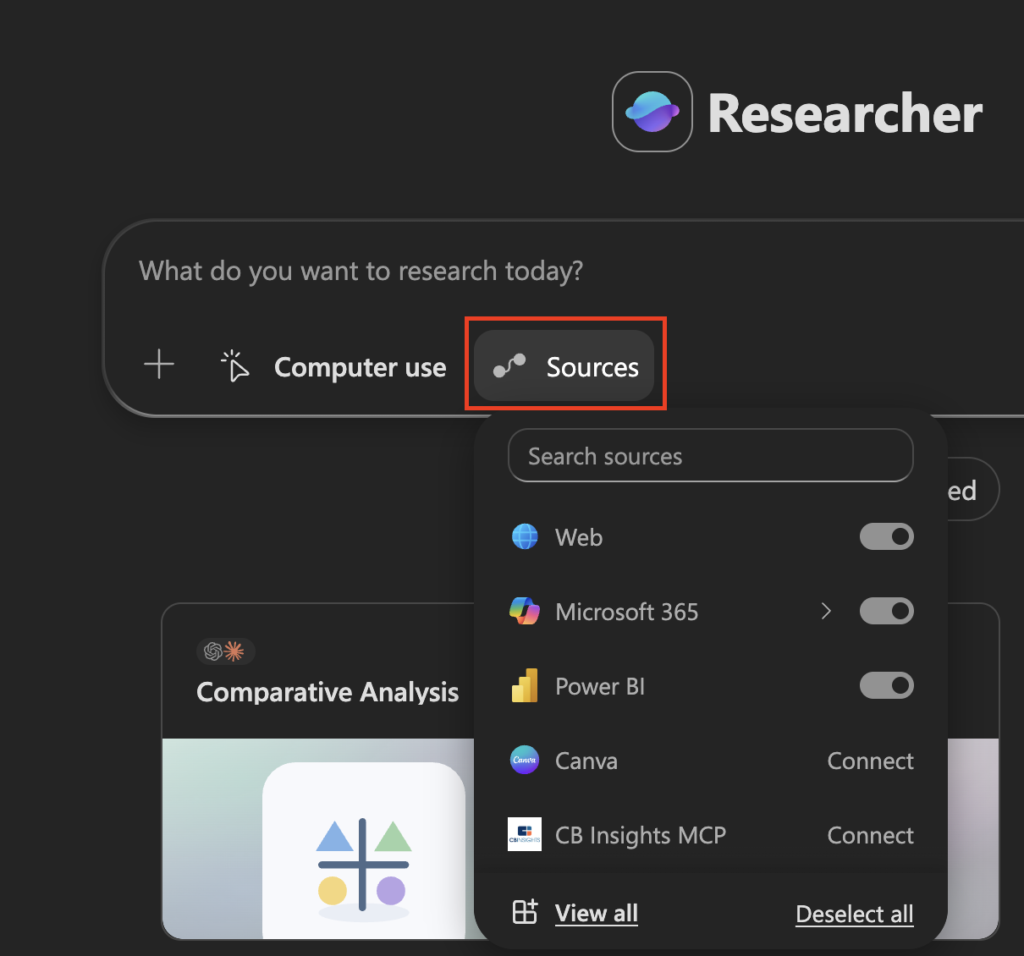
- Use the Sources button to scope whether you want web-only research, your internal work content, or both. If you’ve already got emails or notes about this company, attach them so Researcher grounds its analysis in what you already know:
- Researcher may ask a couple of clarifying questions before it runs. Answer them or just say “go ahead” to let it use its judgment
- The output comes back as a structured report with citations, ready to skim, edit, or paste into a briefing doc
The rule: If the task is “go deep on one topic and give me a trustworthy, sourced report,” that’s Researcher, not Cowork. Researcher already does the multi-step web and document reasoning that would otherwise burn Cowork credits, and it’s included in your Copilot license rather than metered per task.
Quick Decision Framework
Before you open Cowork, run through this:
| Question | If YES | If NO |
|---|---|---|
| Does this task pull from 3+ separate systems? | Consider Cowork | Use Copilot in-app |
| Does the output require multiple reasoning steps? | Consider Cowork | Use a Copilot prompt |
| Will this take me 30+ minutes manually? | Consider Cowork | Use Copilot in-app |
| Is there a native Copilot experience for this app? | Use the in-app Copilot | Consider Cowork |
If you answered “no” to the first three and “yes” to the last one, you don’t need Cowork. You need a better prompt.
So When Should You Use Cowork?
Cowork earns its credits when the work is genuinely complex, long-running, and multi-system. Think of these as your Cowork-worthy scenarios:
- Batch research and deliverable production: “Analyze the last six months of customer feedback across email, Teams, and SharePoint and produce a trends report with a leadership-ready summary deck”
- Recurring report automation: Schedule a weekly digest that pulls from multiple dashboards, meetings, and files, then formats and delivers it without you touching it
- Multi-output tasks: Produce a strategy doc, a corresponding presentation, and a stakeholder email, all from one set of inputs, without you stitching them together manually
- Long-horizon tasks that run while you’re offline: Because Cowork is cloud-hosted, it keeps working even when your laptop is closed
The signal that Cowork is right: you’re describing work that would normally take hours and touch multiple systems. If it would take you 10 minutes manually, it probably should take you one good prompt.
The Bottom Line
Cowork is genuinely impressive and genuinely metered. Now that the grace period is ending, using it indiscriminately isn’t just wasteful, it’s going to show up in your organization’s cost reports.
The best thing you can do right now is map your most common work tasks to the right Copilot experience. Cowork when the task warrants it. Copilot in-app when it doesn’t. A great prompt can go a long way before a single credit is spent.