This week marked a milestone for me, attending my first Microsoft conference as a Microsoft Certified Trainer (MCT), and it did not disappoint.
The sessions were insightful, the product roadmap eye-opening, but what truly stood out was connecting with fellow trainers, MVPs, and product owners who generously shared their expertise and perspectives. Those conversations alone were worth the trip.
There’s something powerful about being in a room full of people who are genuinely excited about making technology work better for everyone, and I can’t wait to bring these insights directly to my clients.
Below are the themes that resonated with me most throughout the week:
Content Governance
As organizations accelerate their adoption of AI and expand their use of Microsoft 365, the need for robust content governance has never been greater. Content sprawl and oversharing are consistently cited as two of the most significant concerns organizations face when rolling out Copilot. Microsoft is responding with a meaningful set of new capabilities designed to give administrators more visibility, control, and accountability over their environments. New file level reporting within SharePoint Advanced Management brings granular insight into how content is being stored and managed at the individual file level, making it easier to identify risk and enforce policy. Rounding out the updates is the introduction of the new SharePoint Advanced Management Administrator role in Microsoft Entra ID, a dedicated role that grants the ability to manage all aspects of SharePoint Advanced Management without requiring broader SharePoint or Global Administrator permissions. This means organizations can now assign governance responsibilities to the right people, giving them the access they need to manage SAM features like oversharing reports, site access reviews, and restricted content discovery, all without opening the door to wider administrative privileges across the tenant.
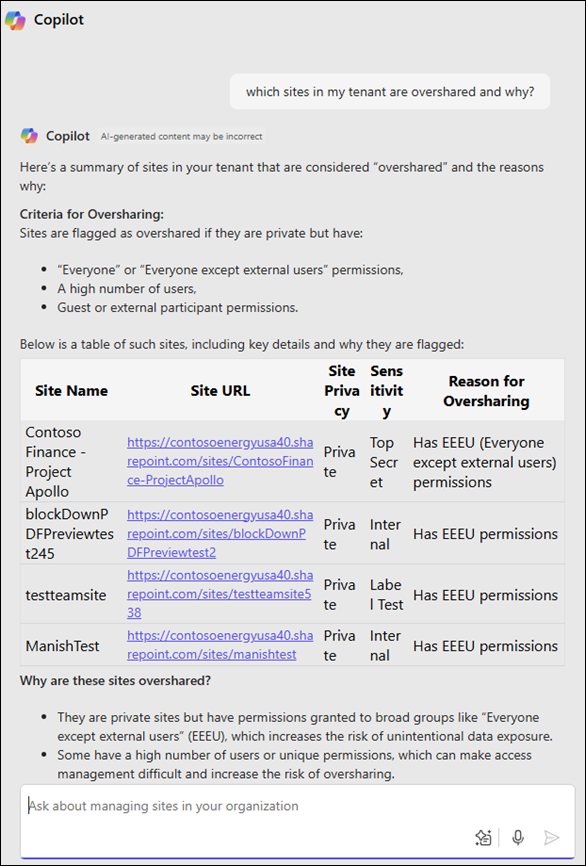
Image Source: Microsoft Learn
Perhaps one of the most exciting additions to the governance story is the new SharePoint Admin Agent. For administrators who manage large and complex SharePoint environments, this agent acts as an intelligent assistant that surfaces insights, identifies potential issues, and delivers actionable recommendations directly within the admin experience. What used to require hours or even days of manual auditing can now be surfaced in minutes, freeing administrators to focus less on hunting down problems and more on making informed decisions that move their organizations forward. What makes this especially powerful is the human in the loop design. The agent does the heavy lifting of analyzing your environment and presenting options, but you remain in the driver’s seat. You review the suggestions, weigh the recommendations, and decide which actions to take. This approach strikes the right balance between the efficiency of AI and the judgment of an experienced administrator, ensuring that the people who know their environments best are always the ones making the final call.
Together these additions make clear that Microsoft understands governance is not an afterthought but a foundational requirement, especially as the volume of AI generated and AI referenced content continues to grow across organizations.
Work IQ
Work IQ isn’t an entirely new concept, but it was one of the most emphasized themes of the week and for good reason. At its core, Work IQ is the data layer that Copilot Chat and agents reference to build a deeper, more meaningful understanding of who you are at work. But this goes far beyond simply knowing which files you have access to. Work IQ understands who you collaborate with most frequently, which projects you are actively involved in, the nature of your working relationships, and the context that surrounds your day to day interactions. Think of it as the intelligence layer that sits beneath everything, quietly learning the patterns of how you work so that Copilot and agents can surface the right information, to the right person, at the right time. As AI becomes more deeply embedded in our workflows, Work IQ is what separates a generic assistant from one that actually understands your world. The more Microsoft invests in this layer, the more personalized and powerful the Copilot experience becomes for every user.
Hero Links
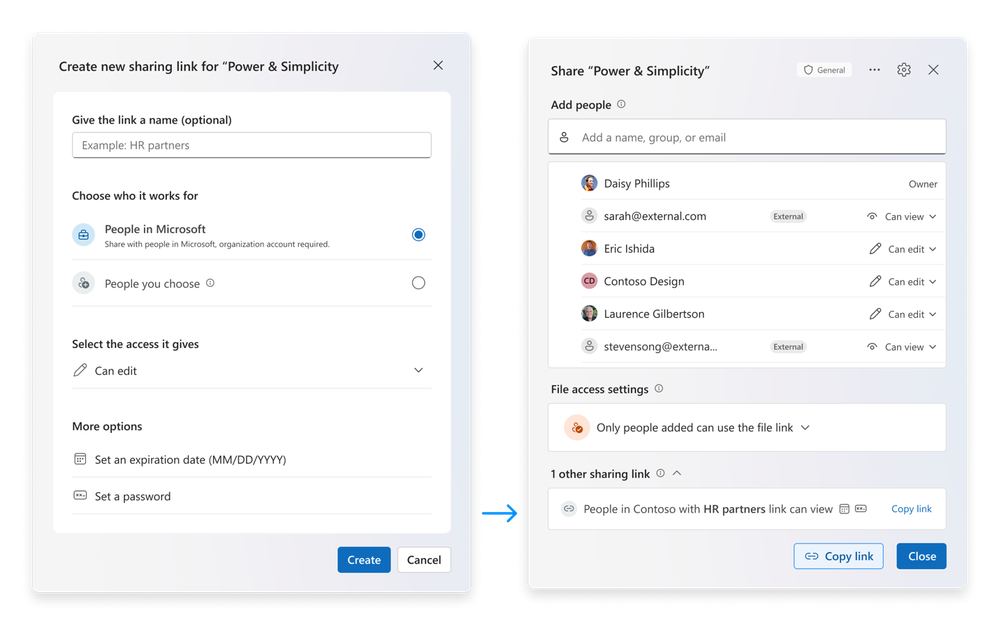
Image Source: Microsoft Tech Community
The future of sharing is changing! Hero links are revolutionizing the sharing experience in a way that we didn’t know we needed. One phrase from the product manager has been living in my head rent free ever since: “Learn it once, and apply it everywhere.” That single line captures the entire philosophy behind Hero Links. The goal is a consistent, intuitive sharing experience that works the same way regardless of where you are in the Microsoft 365 ecosystem. No more hunting through different menus or navigating inconsistent interfaces depending on whether you’re in SharePoint, OneDrive, or Teams.
Each file gets one single Hero Link that controls all access to that file. Whether you click “Copy Link”, send it via email, or copy the URL directly from the address bar, it is all the same link. No more creating, managing, or deleting multiple links for a single document. If you need to open up access to your entire company, simply update the Hero Link and anyone in your organization with the link gets in. Need to lock it back down? Change it, and access is immediately restricted. Even better, if you have already sent a link and realize the permissions are not quite right, you can update the link you already sent without needing to resend anything.
Security is also baked in from the start. Every Hero Link begins locked down to only the people who have already been added to the document, and external users are clearly tagged so they are easy to identify and manage. Permissions can now be edited in bulk and changes appear in real time, giving administrators and users alike a much cleaner and more confident sharing experience. And for those days when your notifications are out of control from being added to files back to back, you now have the option to choose whether or not an email notification is sent at all.
The Hero Link is rolling out across all 64 apps powered by OneDrive in Microsoft 365, making this one of the most far reaching sharing improvements Microsoft has ever shipped. Hero links are currently in private preview.
The Refreshed Microsoft Planner App
Do you struggle knowing when to use Microsoft To-Do, Microsoft Planner or Microsoft Project? The new Planner experience fixes that. The days of manually building out project plans task by task, bucket by bucket, are officially behind us. The new Planner app and its integrated agent are set to fundamentally transform the way teams plan and manage their work. Rather than clicking through menus and manually entering every detail, users can now simply describe what they need in plain conversational language and let the Planner agent handle the heavy lifting. Need to set up a project plan for a product launch? Just tell it what you’re working on and watch it build the structure for you. Want to update a task, shift a deadline, or reorganize your buckets? Have a conversation with the agent and it’s done.
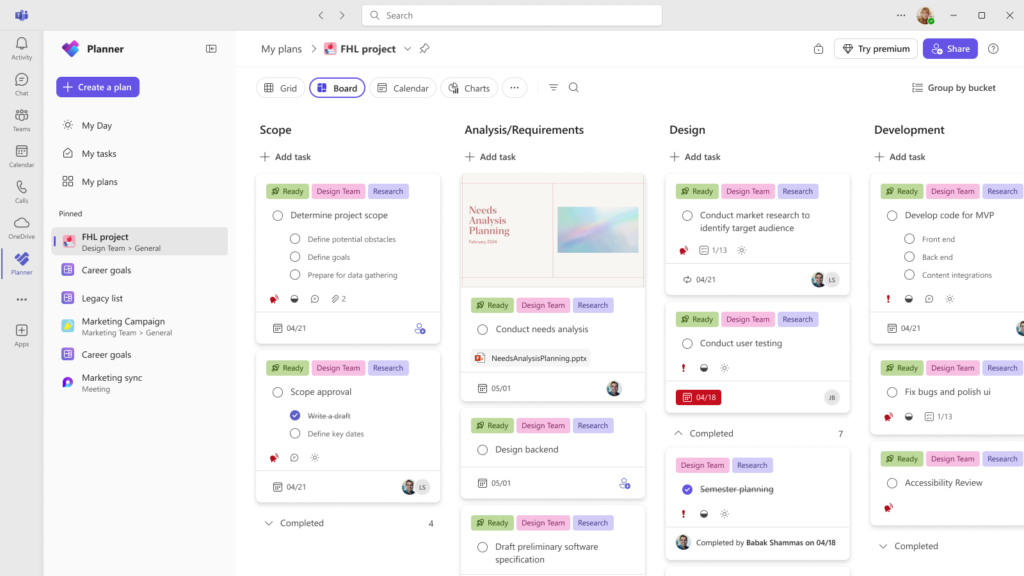
Image Source: Microsoft Tech Community
Whether you are just starting your Copilot journey or are deep in the trenches of governance and security, there has never been a more exciting time to be working in the Microsoft 365 space. Thanks for reading my recap, and stay tuned as I continue to dive deeper into some of these topics!